The job search function allows you to find and perform limited editing on jobs.
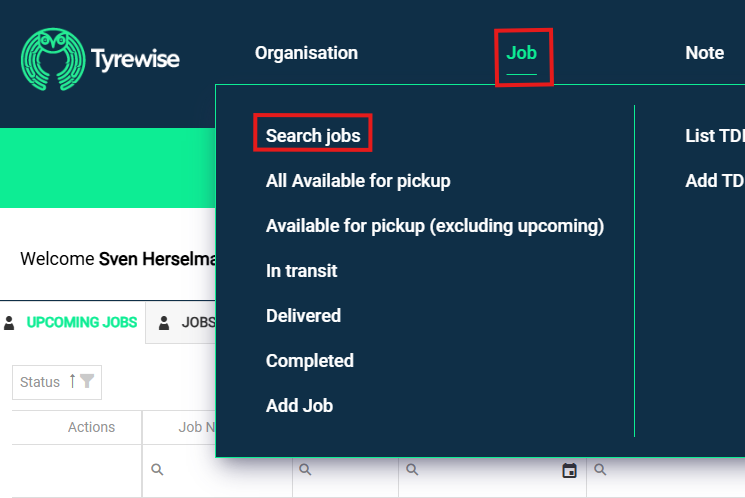
Log into admin.tyrewise.co.nz and click the 'Job' heading at the top of the page and then click 'Search jobs'.
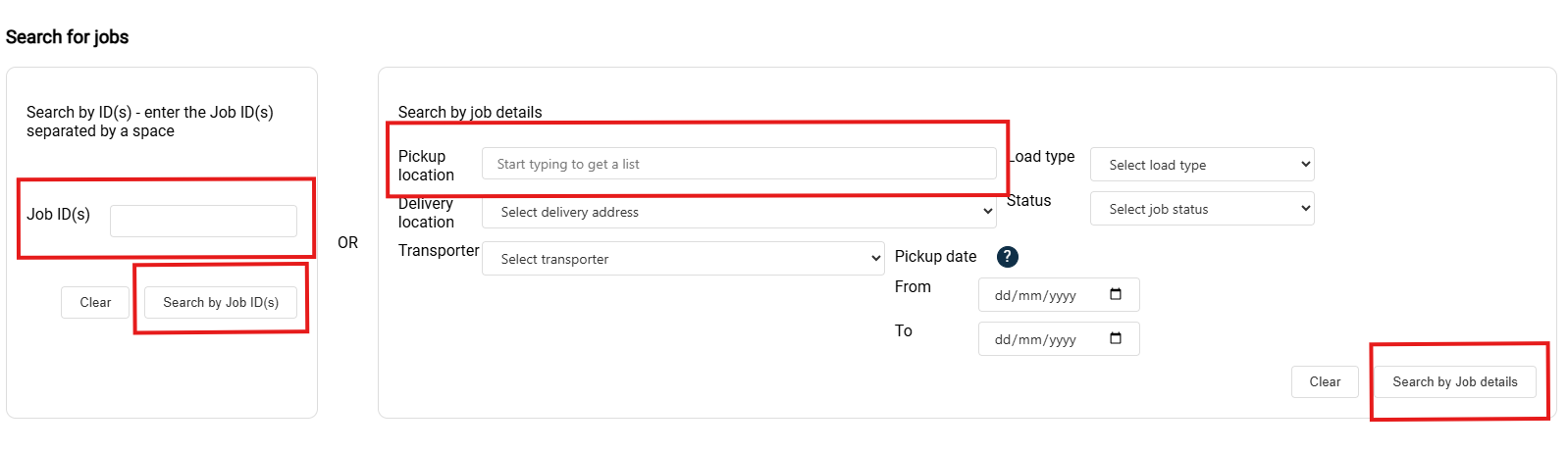
Enter your business name in the Pickup location field and click Search by Job details. Or, enter the job number (if known) in the Job ID(s) field and click Search by Job ID(s).
If a job has been created it will appear lower on the page under 'Status: Available for Pickup'

Clicking on the wording 'Status: Available for Pickup' will drop down further information options, such as the option to edit the job. NOTE: Editing is limited to functions such as updating tyre numbers. If you want to change transporters you will need to get in touch with Tyrewise.

Was this article helpful?
That’s Great!
Thank you for your feedback
Sorry! We couldn't be helpful
Thank you for your feedback
Feedback sent
We appreciate your effort and will try to fix the article